

Introduction
Sensitivity settings in PUBG Mobile control how fast the camera and aim move when the player swipes or uses gyroscope controls. These settings affect aiming, recoil control, and movement accuracy. Many players adjust sensitivity based on device type and play style.
This guide explains PUBG Mobile sensitivity settings, how they work, and how to adjust them.
What Are Sensitivity Settings in PUBG Mobile
Sensitivity settings define how responsive the screen is to movement.
Main categories:
- Camera sensitivity
- ADS sensitivity
- Gyroscope sensitivity
- Free look sensitivity
Each category controls different movement behavior.
PUBG Mobile Sensitivity System
PUBG Mobile uses multiple sensitivity layers to control aim and movement.
Purpose
- Control recoil
- Improve aiming accuracy
- Adjust camera movement
- Support different devices
Camera Sensitivity Settings
What It Controls
Camera sensitivity controls how fast the view moves without firing.
Common Use
- Scanning environment
- Tracking enemies
- Movement during exploration
Adjustment Method
Players increase or decrease sensitivity based on swipe speed.
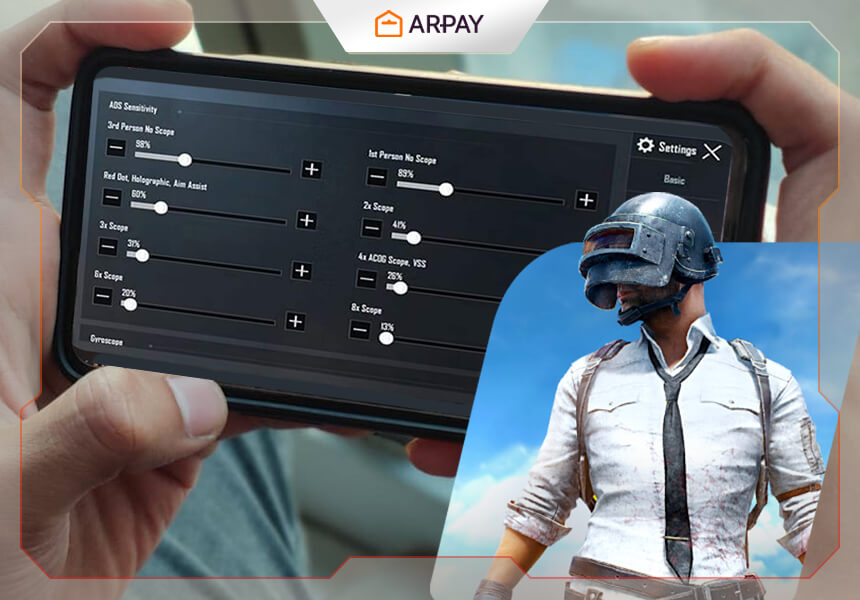
ADS Sensitivity Settings
What It Controls
ADS (Aim Down Sight) sensitivity controls aim movement while firing.
Common Use
- Shooting enemies
- Controlling recoil
- Adjusting crosshair during combat
Adjustment Method
Lower ADS sensitivity helps control recoil, higher sensitivity improves quick aim movement.
Gyroscope Sensitivity Settings
What It Controls
Gyroscope uses device movement to control aim.
Types
- Always on
- Scope only
- Off
Common Use
- Recoil control
- Precision aiming
- Close combat adjustments
Adjustment Method
Players test each scope level separately.
Free Look Sensitivity
What It Controls
Free look allows camera movement without changing direction.
Common Use
- Checking surroundings
- Vehicle movement
- Parachuting view control
Sensitivity by Scope Type
No Scope
Used for basic movement and hip fire control.
Red Dot and Holographic
Used for close range fights.
2x and 3x Scope
Used for mid-range combat.
4x Scope
Used for long-range aiming.
6x and 8x Scope
Used for sniper control.
Device-Based Sensitivity Adjustment
Low-End Devices
- Lower sensitivity for stability
- Reduced motion speed
Mid-Range Devices
- Balanced sensitivity
- Moderate control settings
High-End Devices
- Higher sensitivity possible
- Smooth gyroscope response
Control Styles in PUBG Mobile
Two-Finger Control
Basic control system for new players.
Three-Finger Control
Allows movement and shooting at the same time.
Four-Finger Control
Used for advanced gameplay control.
Gyroscope-Based Control
Uses device movement for aim adjustment.
How Sensitivity Affects Gameplay
Aiming Control
Sensitivity affects crosshair movement.
Recoil Control
Proper settings reduce weapon recoil.
Reaction Time
Sensitivity changes how fast players respond.
Movement Tracking
Helps follow enemy movement.
Common Sensitivity Mistakes
Using Default Settings
Default settings may not match player preference.
High Sensitivity Without Control
Too high sensitivity reduces accuracy.
Ignoring Gyroscope
Many players avoid gyroscope but lose recoil control advantage.
Not Testing in Training Mode
Settings should be tested before matches.
Sensitivity Adjustment Process
Step 1: Start Default
Begin with default values.
Step 2: Adjust Camera
Change movement speed based on comfort.
Step 3: Adjust ADS
Test shooting control in training mode.
Step 4: Adjust Gyroscope
Test recoil control with different scopes.
Step 5: Final Testing
Use training mode to confirm stability.
Training Mode Usage
Players use training mode to:
- Test weapons
- Adjust recoil control
- Practice aiming
- Try different sensitivity levels
Sensitivity for Different Play Styles
Aggressive Play
Higher sensitivity for fast movement.
Defensive Play
Lower sensitivity for control.
Balanced Play
Medium sensitivity for stable gameplay.
Weapon Impact on Sensitivity
Assault Rifles
Require balanced ADS sensitivity.
Sniper Rifles
Require stable low sensitivity.
SMG Weapons
Require fast close-range movement.
Shotguns
Require quick aim adjustment.
Gyroscope Training Tips
Recoil Practice
Use training range to control recoil.
Scope Adjustment
Test each scope separately.
Movement Control
Combine gyroscope with finger movement.
Update Impact on Sensitivity
Game updates may change:
- Weapon recoil
- Aim mechanics
- Movement speed
Players often re-adjust settings after updates.
Pro Player Sensitivity Approach
Professional players focus on:
- Consistent aim control
- Stable recoil management
- Custom control layout
- Gyroscope usage
Sensitivity Sharing System
Many players share sensitivity codes that can be imported directly into the game.
Conclusion
PUBG Mobile sensitivity settings control aiming, recoil, and movement. Proper adjustment improves gameplay stability and shooting accuracy. Players should test camera, ADS, and gyroscope settings in training mode to find suitable control levels for their device and play style.






Leave a Reply